
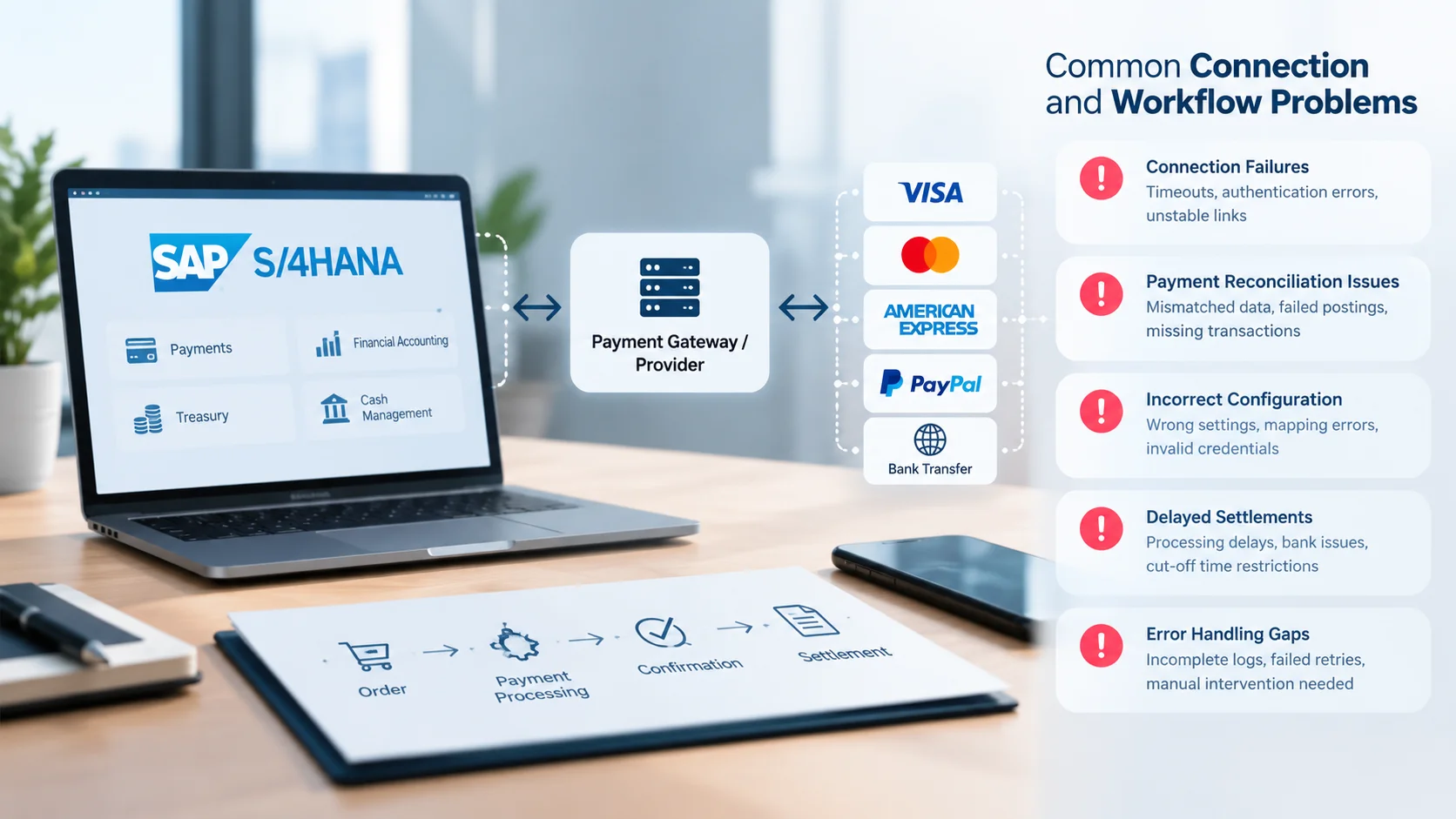
A payment integration can pass testing and still fail in week three, an authorization expires before shipment, a settlement refuses to match, or a certificate quietly stops working. This guide maps the most common connection and workflow problems in SAP S/4HANA card payments, shows what to check first, and explains what to demand from your payment provider so the same problems do not return.
Most failures sit in four places: configuration links between SAP and the provider, authorization timing, settlement matching and testing gaps. Diagnose in layers, from connection to business process to finance. Then pick a provider and integrator that expose clear error data, because opaque errors turn small issues into long outages.
How the Payment Flow Should Work
Know the happy path before you chase the exceptions. In the SAP Digital Payments add-on scenario, the flow runs like this.
- Card registration: The card is stored at the payment service provider and tokenized.
- Authorization: The sales order sends the selected card to the provider through the add-on.
- Delivery and billing: Goods ship and open items post to receivables.
- Settlement: A job selects payments for settlement, which is the capture step, and creates an open item against the provider’s clearing account.
- Reconciliation: Automatic reconciliation follows if the provider supports digital advice processing.
Each step has its own failure mode. Treat them separately.
Connection Problems
1. Missing Communication Arrangements or RFC Destinations
This is the classic first-week failure. SAP’s own message catalog includes errors for a missing communication arrangement for a replication job and an RFC destination missing for a company code when contacting Digital Payments. You may see them as DIGITAL_PAYMENTS028 or DIGITAL_PAYMENTS750.
What to check: every company code that processes card payments has its own destination and arrangement, not only the one you tested.
2. Certificate and Credential Errors
Secure connections depend on certificates. Certificate management is a separate setup topic in the add-on configuration, alongside roles and authorization setup.
When a certificate expires or does not match, the message users see is often vague. A related SAP knowledge article for another SAP product shows certificate validation problems surfacing as a generic technical error in payment authorization.
What to check: certificate expiry dates, who renews them, and whether renewal is on a calendar.
3. Provider Routing and Merchant Configuration Mismatches
SAP routes each request to a provider based on configuration. Errors such as routing that contains a merchant not configured at the provider and authorization requests that fail because the merchant cannot be determined point to mismatched setup. Look for DP_SHARED183 and DP_SHARED186.
This matters most in multi-provider designs. A business unit routed to a specialist high-risk payment provider needs its merchant IDs and routing rules documented, or payments will fall through to the wrong account.
4. Webhook and Event Gaps
Webhook setup and event management is its own configuration step in the add-on. When events fail to arrive, a payment can be complete at the provider yet still look open in SAP.
What to check: retry behavior, failed-event alerts and who gets notified when an event is dropped.
Workflow Problems
5. Authorizations That Expire Before Shipment
Authorizations do not last forever. SAP lets you set an authorization validity period in days per card type, and one example uses 14 days. If fulfillment takes longer, the authorization lapses.
When that happens, the sales order and its delivery receive a credit block. Orders sit unshipped while finance and logistics wait on each other.
What to check: compare your longest realistic order-to-ship time with the validity period for each card type.
6. Split Shipments and Partial Deliveries
One authorization may not cover multiple deliveries. SAP describes a sales order with two deliveries where only one authorization exists, so a second authorization is needed. A dedicated app lets users re-authorize in such cases.
What to check: test split deliveries before go-live, and decide who owns re-authorization.
7. Credit Blocks That Stall Deliveries
Blocked deliveries are a business problem, not just a technical one. Once a card issue is resolved, a recheck can be triggered from the documented credit decision. Teams that do not know this step often release deliveries manually, which skips controls.
What to check: a short runbook that tells customer service how to clear a card-related credit block.
8. Settlement Items That Will Not Match
Settlement is where finance feels the pain. Errors such as a transaction in the response that cannot be assigned to an item (DIGITAL_PAYMENTS752) usually mean the provider’s reference and SAP’s open item no longer line up.
Common causes include partial captures, reversed authorizations and timing differences between capture and settlement.
What to check: the transaction reference format the provider sends and how SAP maps it to the open item.
9. No Digital Advice, So Manual Reconciliation
Automatic reconciliation depends on the provider supporting digital advice processing. If yours does not, finance matches payouts by hand.
The market knows this is painful. Integration vendors sell daily settlement-batch reconciliation precisely because manual matching of provider settlements to the general ledger is a common burden. clarity-ventures
What to check: ask your provider whether it supports advice files for your add-on version before you sign.
10. Refunds, Voids and Chargebacks Left Untested
Teams often test a successful sale and stop there. Refunds, voids and chargebacks follow different paths and often reveal mapping gaps.
What to check: a test plan that covers full refund, partial refund, void before capture, and a chargeback arriving after the open item cleared.
A Realistic Failure Story
This is a composite example, not a real case. A manufacturer with US and UK entities goes live on a Monday after a clean pilot in one company code.
By Wednesday, UK orders fail with a merchant error because the second entity was never added to the routing table. The team fixes it, but a week later 60 orders are credit-blocked, because lead times for custom items exceed the card validity period.
Then month-end arrives. Settlement items do not match, since the provider does not send advice files in the format the add-on expects. Finance spends two days matching by hand.
None of these problems was exotic. Each came from a missing check that a short test plan would have caught.
Quick Diagnosis Table
| Symptom | Likely cause | First check |
|---|---|---|
| Authorization fails for one company code only | Missing arrangement or RFC destination | Company-code-level connection settings |
| Sudden failures across all authorizations | Expired certificate or credential | Certificate dates and renewal log |
| Merchant not determined | Routing or merchant mismatch | Provider routing table |
| Orders stuck with credit block | Expired authorization | Validity period vs shipping time |
| Paid at provider, open in SAP | Missed webhook or event | Event logs and retry settings |
| Settlement will not match | Reference mismatch or partial capture | Provider reference mapping |
| Payouts need manual matching | No digital advice support | Provider capability list |
A Layered Troubleshooting Order
When a ticket arrives, work from the bottom up.
- Connection layer: certificates, credentials, communication arrangements, destinations
- Configuration layer: provider routing, merchant IDs, card type settings
- Event layer: webhooks, retries, failed-event queues
- Process layer: authorization validity, credit blocks, split deliveries
- Finance layer: settlement references, clearing accounts, advice files
Skipping layers wastes hours. A credit block may look like a finance issue when the root cause is an expired certificate three layers down.
A Go-Live Test Plan That Catches Most Issues
Run these tests in a sandbox that mirrors production before any live traffic.
- Authorize, ship and settle one order per company code
- Let an authorization expire and confirm the credit block appears and clears
- Ship one order in two deliveries and confirm re-authorization works
- Issue a full refund, a partial refund and a void before capture
- Simulate a chargeback after the open item has cleared
- Disable a certificate in the test system and confirm alerts fire
- Drop a webhook on purpose and confirm the retry and alerting process
- Reconcile a full day of settlements and confirm every item matches
Assign each test an owner in IT or finance. A test without an owner rarely gets run twice.
What Poor Integration Costs
Use simple math to make the case internally. Suppose you process 10,000 card orders a month and 1% are held by expired authorizations. That is 100 blocked orders.
If each takes 15 minutes to clear, your team spends 25 hours a month on releases alone. Add shipping delays and support contacts, and the cost grows. These numbers are illustrative, so replace them with your own order data.
What to Demand From Your Payment Provider
A good connector hides the complexity of payment processing, but a good payment provider also shows its work. When you evaluate options, ask for:
- A live, supported connection for your exact SAP product and version
- Clear error codes with documented fixes, not generic failures
- A sandbox that mirrors production, including refunds and chargebacks
- Settlement and advice files that map to SAP documents
- Webhook retry logic and failed-event alerts
- A support route that includes someone who understands SAP, not only the payment gateway
US and UK Considerations
- US: Confirm the acquiring bank and how card data and tokens are handled across states and business units.
- UK: Confirm GBP settlement, the provider’s regulatory status with the Financial Conduct Authority, and how your UK entity maps to the provider’s merchant accounts.
- Both: Confirm data residency and token portability if you ever switch providers.
Who Should Be Involved From Day One
Payment projects fail when only one team owns them. Bring in IT for connections and certificates, finance for clearing and reconciliation, logistics for delivery timing and customer service for credit blocks.
Also name one person at the provider and one at your integrator as escalation contacts. When a problem crosses systems, that short list saves hours.
Prevention Checklist
- Calendar every certificate and credential renewal
- Document routing rules for every company code and business unit
- Match authorization validity periods to real fulfillment times
- Define who owns re-authorization and credit-block clearing
- Test refunds, voids and chargebacks before go-live
- Monitor failed events and reconciliation exceptions daily
- Keep a second provider ready so one outage does not stop merchant payment flow
FAQ
Why do payments succeed at the provider but not appear in SAP?
Usually because an event, webhook or status update did not arrive or could not be assigned to an open item.
How long should an authorization stay valid?
Match the validity period to your longest typical order-to-ship time, per card type, and plan for re-authorization beyond that.
Can I use more than one provider with SAP?
Yes, but each one needs correct routing and merchant configuration, or payments can fail or land in the wrong account.
Who should own these problems, IT or finance?
Both. Connection issues sit with IT, while settlement and clearing sit with finance. A shared runbook avoids hand-off delays.
The Bottom Line
Most SAP S/4HANA payment problems are predictable. They come from missing links, expiring authorizations and settlement that cannot be matched. Diagnose in layers, test the unhappy paths and choose a provider that makes errors visible and reconciliation automatic.
Before you shortlist, compare vetted enterprise and high-risk payment providers in the TheFinRate directory.
Comments
No comments yet. Be the first to share your thoughts.
Leave a comment