
A customer pays. The gateway confirms the charge. Your store still shows the order as pending, or marks it paid twice, or cancels it an hour later. Support gets the angry email, and finance gets a reconciliation puzzle.
None of this means the payment failed. It means a message went missing, arrived late or showed up twice. This guide explains why that happens, how to design around it, and what to look for in payment providers whose webhook tools either help you or leave you guessing.
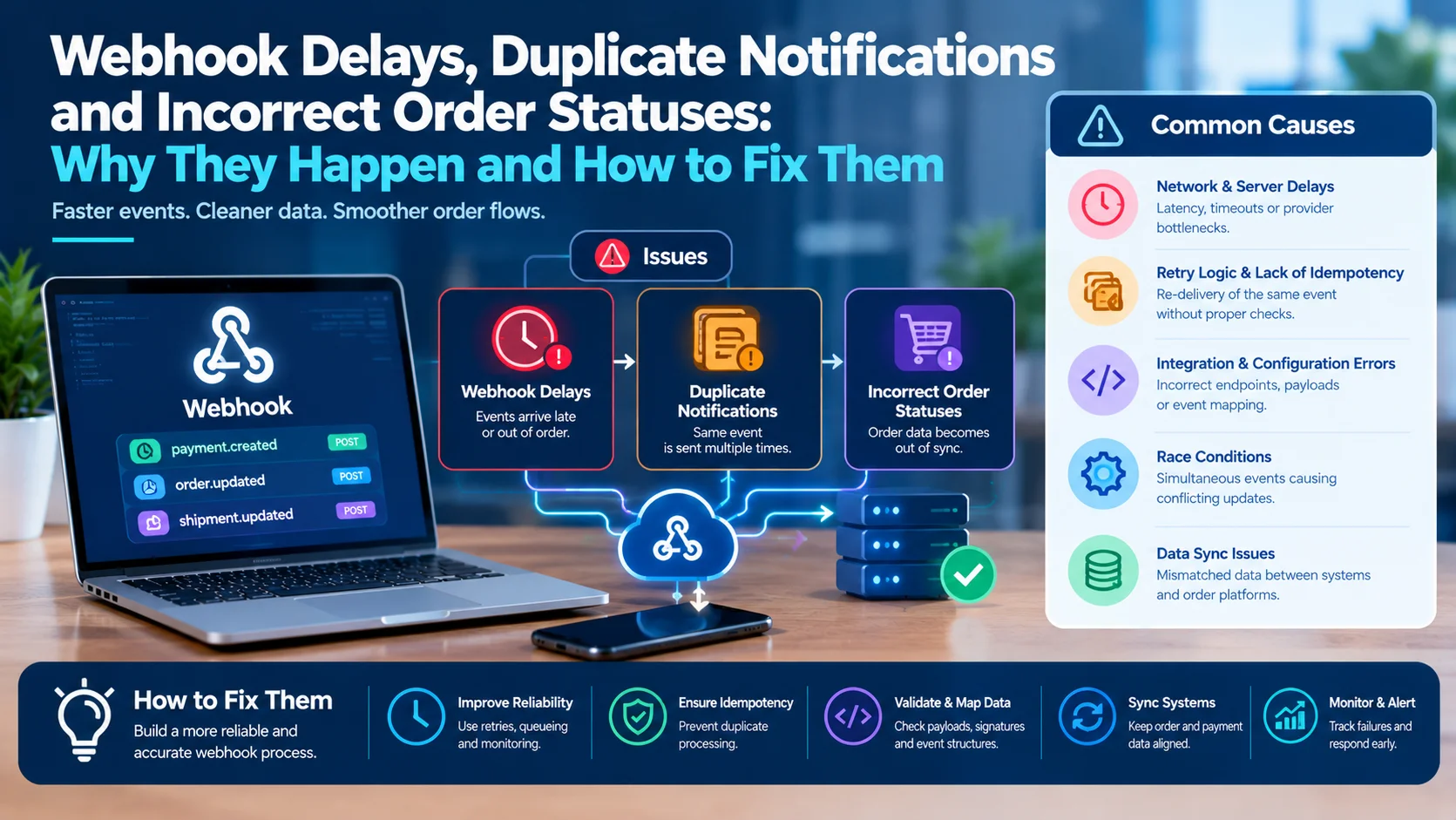
Webhooks are delivered at least once, not exactly once, not instantly and not always in order. Build your handler to verify, record, acknowledge fast and process later. Deduplicate on event IDs, apply status changes through clear rules, and add a fallback that asks the gateway directly when a message never arrives.
What a Webhook Actually Does
In most payment flows, two things happen at the same time. The customer returns to your site, and the gateway sends a separate server-to-server message confirming the result.
It is that second message, not the customer coming back, that moves the order forward. If it does not arrive, the order stays pending even though the payment went through.
That design is useful, because customers close browsers and lose connections. But it makes your order system depend on a message you do not control.
The Delivery Model You Must Plan For
Think of every webhook as an unreliable courier. Treat it as an untrusted, at-least-once message: verify it, persist it once, acknowledge it quickly, and make every downstream effect recoverable.
The sender may retry after a timeout, deliver the same event more than once, send related events out of order, or redeliver an old event during recovery. Each of those behaviors creates one of the three problems below.
Problem 1: Delayed or Missing Webhooks
The payment is real, but your system never hears about it, or hears late.
Common Causes
- A stale endpoint: The most common cause after a site move is a webhook that still points at the old address.
- Blocking layers: A security plugin, a firewall rule or a maintenance page can stop the callback.
- Endpoint errors: Firewalls, timeouts, an empty 204 response, a live and test key mix-up or a crash right after checkout can all prevent the order from updating.
- Slow handlers: One engineer notes a provider timeout of about 30 seconds but recommends aiming for five seconds or less. A handler that does heavy work before replying invites retries.
- A disabled endpoint: If a scheduled retry comes due while an endpoint is disabled, the provider may stop retrying that event.
- Crash after acknowledging: If your endpoint returns success but crashes before saving anything, the event is lost on your side while the provider believes it was delivered.
How Long Do Retries Last?
It varies by provider. One guide lists a Stripe-style schedule that starts immediately and stretches over roughly 72 hours with growing gaps. Check your own provider's documentation, because a window that ends before you notice the problem leaves you with a permanent gap.
Problem 2: Duplicate Notifications
The same event arrives twice, or two events describe the same change.
At-least-once delivery is the documented contract, and a handler that grants access without deduplicating can grant it twice. That is harmless for a simple status update but costly if you ship goods, send emails, issue credits or add to a balance.
Why Event IDs Are Not Enough
A provider can emit two different events that describe the same business transition, so an event ID alone does not protect you. Add business-level checks too, such as a unique constraint on the order's payment ID.
Practical Fixes
- Store every processed event ID before doing the work
- Use upserts instead of plain inserts
- Put a unique constraint on payment ID per order
- Make side effects such as emails and shipments run once per order, not once per event
Problem 3: Incorrect Order Statuses
Even when every message arrives, the order can end up wrong.
Out-of-Order Events
One example shows a new subscription generating several events, and the provider does not promise they arrive in the order they were created. An update event may reach you before the creation event for the same object.
A handler that assumes the latest event reflects the latest state will produce strange bugs that take days to trace.
The Stale Overwrite
When an older event lands after a newer one, it can push an order backward. For objects you cannot refetch, you may have to store the event's fields and accept the risk of overwriting with stale data. Compare timestamps or version numbers before applying any update.
The Silent Cancellation
A common pattern is a successful charge at the gateway, an order that never leaves pending, and a cancellation about an hour later. By then stock may be released and the customer may have been told the order failed.
A Worked Example
This is an illustrative timeline for a mid-sized online store. A firewall rule blocks the gateway's callback for 90 minutes after a software update.
| Time | What happens |
|---|---|
| 12:00 | Customer pays $180. Gateway confirms the charge |
| 12:01 | Webhook fails. Order stays pending |
| 13:00 | Store cancels unpaid orders after one hour and releases stock |
| 13:05 | A second customer buys the last unit |
| 13:30 | Firewall is fixed, and the gateway retries the original event |
| 13:31 | Store receives a payment confirmation for a cancelled order |
The store now holds $180 for an item it no longer has. It must refund the first customer, apologize, and explain the gap to finance. Nothing was wrong with the payment processing. The failure was in what happened after it.
A Reliable Handler Design
Follow the same sequence every time.
- Verify the signature: Reject invalid requests with a client error. A failed signature check should not trigger a retry.
- Record the event ID: Insert it once, ideally with a unique constraint.
- Acknowledge fast: Return a success code before heavy work such as updating your accounting system.
- Queue the work: Process in the background so slow tasks never cause retries.
- Apply status rules: Use a state machine so orders only move forward legitimately.
- Log everything: Keep the raw event, the decision and the result.
Use a Simple State Machine
| Current state | Event | Result |
|---|---|---|
| Pending | Payment succeeded | Paid |
| Paid | Payment succeeded again | Ignore |
| Paid | Refund issued | Refunded |
| Cancelled | Payment succeeded | Flag for review, do not auto-ship |
| Any | Older event than the last one applied | Ignore |
One recovery tool is deliberately conservative: it never completes refunded or disputed payments and flags the mismatch instead. Your own rules should do the same.
Add a Fallback: Ask the Gateway
Do not rely on webhooks alone. Run a scheduled job that checks orders stuck in pending longer than a set time and asks the gateway for the real status.
Confirm at the gateway that a payment actually succeeded before changing an order by hand, or you will eventually ship something nobody paid for. A good fallback only completes an order when the gateway unambiguously reports the payment as captured and a transaction ID is present.
If you pause an endpoint, list undelivered events afterward and process them. Make that part of your maintenance checklist.
Monitor the Right Signals
Failed webhooks are silent unless you look. Track these numbers daily.
- Webhook failure rate and average delivery delay
- Orders pending longer than your threshold with a successful gateway payment
- Duplicate event ratio
- Events stuck in a retry or dead-letter queue
- Payment payout events that arrive without a matching order
An alert on the second item catches most real incidents early.
What Poor Webhook Handling Costs
Run a quick estimate. Suppose you process 20,000 orders a month and 0.5% hit a webhook problem, such as a delay, a duplicate or a wrong status. That is 100 orders.
If each one takes ten minutes of support and finance time, you lose about 17 hours a month. Add refunds for orders cancelled after payment, plus the goodwill cost of confused customers, and the true price is higher.
These numbers are illustrative, so replace them with your own order data. The exercise often shows that a few hours of engineering work pays back within a quarter.
Choosing Payment Providers With Better Webhook Tools
Webhook quality varies widely between payment providers. When comparing, ask for:
- A visible delivery log showing each attempt and the response received
- Manual resend for individual events
- A documented retry window and backoff schedule
- Signed requests with timestamps
- Stable event IDs that stay the same on redelivery
- An API to list undelivered events and read current payment status
- Failure alerts by email or dashboard
- A sandbox that lets you simulate delays, duplicates and out-of-order events
Ask how the payment gateway documents ordering, because many do not guarantee it. Also check how settlement and payout notifications are delivered, since a missed payment payout event can leave finance without a record.
A Test Plan Before You Go Live
Simulate failures before customers find them.
- Send the same event twice and confirm only one order update happens
- Deliver a refund event before the payment event and confirm the order ends in the right state
- Take your endpoint offline for an hour, then restore it and confirm retries are processed
- Return a slow response and confirm the handler still acknowledges quickly
- Send a payload with a bad signature and confirm it is rejected without a retry
- Run the stuck-order check and confirm it never completes an unpaid order
Assign an owner to each test and keep the results. They double as evidence when a provider or auditor asks how you handle failures.
What Customer Support Should Do
When a customer says "I paid, but my order is pending," follow a short script.
- Collect the order number, payment reference and time
- Check the gateway dashboard for the payment status and webhook attempts
- If paid, trigger the verified-status check, not a manual override
- If not paid, explain and invite a retry
- Log the case so engineering can spot patterns
Mistakes to Avoid
- Returning success before saving the event
- Trusting arrival order
- Marking orders paid manually without checking the gateway
- Ignoring merchant payment events in test environments, then failing in production
- Letting the cancellation timer run shorter than your retry window
- Skipping monitoring because "it usually works"
FAQ
Why is my order pending when the payment succeeded?
Usually the webhook never arrived or was rejected. The gateway dashboard will show the payment and whether it tried to notify you.
Can I just turn off webhooks and rely on the return page?
No. Customers close tabs and lose connections, so the return page alone will miss real payments.
How do I stop duplicates?
Store event IDs, enforce unique payment IDs per order and make side effects idempotent.
Do better merchant services reduce these problems?
Often yes. Providers with clear delivery logs, retries and status APIs make failures visible and fixable.
The Bottom Line
Webhook trouble is predictable. Messages will be late, doubled and out of order at some point, so your system should expect it. Verify, record, acknowledge fast, apply clear status rules, and keep a gateway check as a safety net.
Before you choose a provider, compare payment providers and their webhook and reporting tools in the TheFinRate directory.
Comments
No comments yet. Be the first to share your thoughts.
Leave a comment